- Actions & Stuff is a Bedrock add-on delivered through the Marketplace, not a Java mod that needs a loader.
- Its animations react to states the game already tracks, such as sneaking, falling, sprinting and where you're looking.
- Gameplay stays vanilla: hitboxes, mob AI, loot and world generation are untouched.
- Load order matters. The pack needs to sit above other packs that edit the player or mob models.
Almost everyone calls it "the Actions and Stuff mod", and that's understandable. It changes so much of how Minecraft looks and feels that it seems like something deeper than a texture pack. Technically, though, it isn't a mod in the Java sense, and knowing what it really is explains most of the questions players have about installing it, combining it with other packs and troubleshooting it.
This guide looks at the add-on from the inside: the systems it uses, how a flip or a roll is triggered, what the settings menu controls, and what it deliberately leaves alone.
Mod, add-on, resource pack: what's the difference?
On Java Edition, a mod is compiled code that hooks into the game through a loader such as Fabric, Forge or NeoForge. Mods can change almost anything, including rendering, AI and networking, but they need a matching loader, a matching game version and usually some dependencies.
Bedrock Edition doesn't support code mods in that way. Instead it has an official add-on system made of two kinds of packs:
- Resource packs change how things look and sound: textures, models (geometry), animations, render controllers, particles, sounds and UI.
- Behaviour packs change how things act: entity components, loot tables, recipes, spawn rules and scripted logic.
Marketplace creators package these packs, test them and sell them through the in-game store. Actions & Stuff is listed in the Marketplace's texture-pack category, and almost everything it does sits on the resource side, the visual and audio layer. That's why the game's mechanics stay vanilla while the world looks so different.
So "Actions and Stuff mod" is a perfectly good name to search for. Just remember there's no loader to install, no .jar file and no version of it that runs on Java.
The building blocks of the pack
Geometry and textures
Every entity in Bedrock, including players, mobs and many items, has a geometry file that describes its boxes ("cubes") and the bones they're attached to. Actions & Stuff ships reworked geometry for a long list of entities and items. That's where the 3D swords, bows, potions, beds, banners, fireworks and honey bottles come from. Each item keeps its pixel-art look but gains real depth when held or displayed.
Textures are touched lightly on purpose. The studio's approach is to stay faithful to vanilla, so the pack blends with normal builds and other content. You'll notice refinements, such as cleaner undersides on blocks like beehives and furnaces (added in the 1.6 update), rather than a whole new art style.
Animations
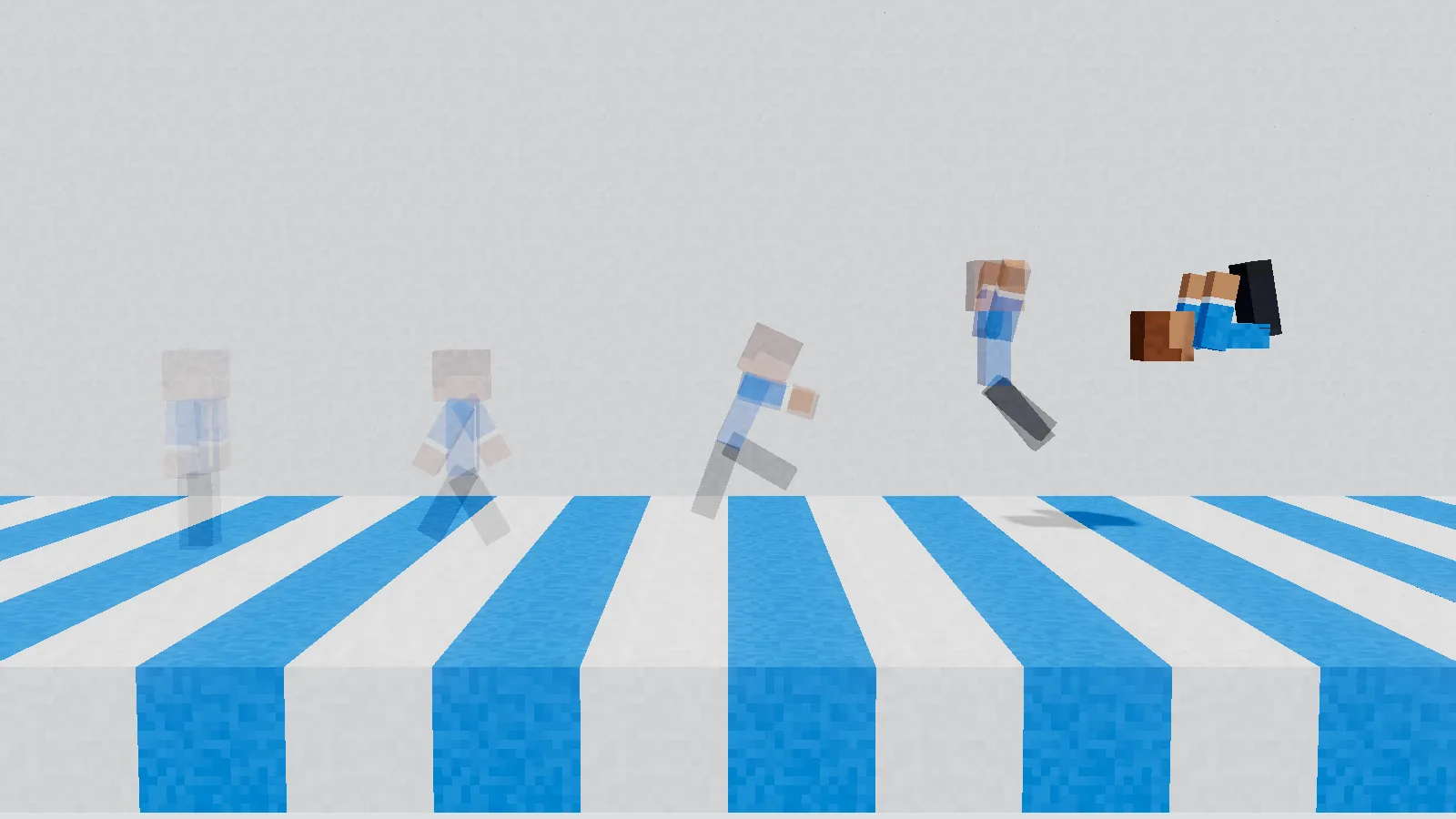
An animation in Bedrock is a timeline that rotates, moves or scales bones over time. Vanilla's player animations are fairly basic: swinging arms and legs, a simple attack swing and a few poses. Actions & Stuff adds a large library of new animations, from idle fidgets and breathing to full actions such as mid-air flips, roll landings and superhero landings with a dust ring.
Animation controllers
This is where the "actions" happen. An animation controller is a small state machine: it sits in one state (say, walking), watches for conditions, and moves to another state (say, landing) when a condition becomes true. The conditions are written in Molang, Bedrock's expression language, which can read things the game already knows about an entity, such as:
- whether it's on the ground or in the air,
- how fast it's moving, and in which direction,
- whether it's sneaking, sprinting, swimming or riding,
- which way it's looking,
- what it's holding.
Put those together and you get the behaviour the 1.10 update is known for. Sprint off a drop of four or more blocks and the controller picks a roll landing. Fall far enough without sprinting and you get a superhero landing. Crouch in mid-air and you flip. Sneak and look down for five seconds and your character sits wherever you are. Walk along a fence, wall, chain or end rod and the controller blends in a balancing pose.
Because these controllers only read game state, they don't change it. A roll landing looks great, but you take the same fall damage you would in vanilla.
Blending
The detail that makes the pack feel smooth is blending. Instead of snapping from one pose to the next, animations cross-fade. The 1.10 "movement overhaul" focused on this: better strafing in combat, the torso lagging slightly behind quick head turns, softer sneaking, blended jumps and landings, and refined hurt reactions. None of these are flashy alone, but together they're why players say the game feels alive.
Particles and sound
Particle effects such as dust rings, candle flames, rain and confetti, plus new sound events for flips, rolls and landings, complete the picture. They're also the parts that cost the most performance on low-end devices, which is why the settings menu can switch several of them off.
A worked example: one roll landing
To see how these pieces fit together, follow a single sprint jump off a ledge from start to finish.
Running. You're sprinting along a hilltop. The controller is in its locomotion state, blending a run cycle with a slight forward lean. Your torso trails a few degrees behind your head as you steer, which is one of the subtle 1.10 movement touches.
Take-off. You jump. The game reports that you've left the ground, and the controller switches to an airborne state. Arms rise, legs tuck a little, and the blend smooths the change so there's no visible snap.
The drop. The ledge is five blocks high. While you fall, the game keeps track of your vertical speed and how far you've dropped. The controller doesn't act yet. It's waiting to see how the fall ends.
Contact. You land while still sprinting, after a drop of more than four blocks. That combination matches the roll-landing condition, so instead of the normal landing pose the controller plays a forward roll. A dust particle burst fires at your feet and a roll sound plays.
Recovery. When the roll ends, the controller blends back into the run cycle, and you keep moving as if nothing happened, because, as far as the game's physics are concerned, nothing did. You took the same fall damage as in vanilla, and your hitbox stayed the normal player size throughout.
Had you landed without sprinting, the same drop would have produced the superhero landing instead. Had you crouched in mid-air, you'd have flipped. Every action in the pack follows this pattern: read state, pick an animation, blend in and out, and leave the gameplay alone.
The settings menu
Since version 1.10, Actions & Stuff has had a pack settings menu, opened from the pack's entry in the resource-pack screen. It turns individual systems on and off and adjusts some visual choices. According to the 1.10 notes, the options cover things like:
- 3D tools on or off (some players prefer flat swords and pickaxes),
- axolotl colour options,
- morph visibility,
- entity variants,
- enchantment glint,
- totem opacity,
- rain particles.
Treat the menu as your performance dial as well as a style choice. On older phones, switching off rain particles and 3D tools is the quickest way to get frames back. Our MCPE guide has a full mobile tuning routine.
Name tags, variants and morphs
A big part of the pack's personality comes from variants: alternative looks that appear naturally or when you rename a mob with a name tag.
- Biome variants. In 1.10, mobs in a Cherry Grove can spawn with cherry-blossom overlays, including the pink "Blossom" Creeper and the "Strawberry" Cow. The "Cherry" name tag triggers them anywhere.
- Baby variants. With Tiny Takeover support, every mob has a baby form. Hostile babies spawn at about a 0.5% chance and friendly babies at 5–20% depending on the mob. Baby chickens get their own name tags, such as "Peep", "Hatchling" and "Egg Head".
- Seasonal sets. Halloween (1.7) and anniversary (1.9) updates added costumes, props and name tags. The 1.11 update added minigame-ready Sulfur Cube name tags that turn the cube into footballs, beach balls and other props.
- Morphs. Version 1.10 added playable morphs: characters such as Rana the Frog Girl, Goober the Slime, Lucy the Axolotl, Pixie the Allay, Iris the Ender Eye and Rusty the Redstone Golem, each with its own visuals, sounds and first- and third-person animations.
Variants are cosmetic. A cherry cow still drops what a cow drops.
What the pack deliberately doesn't change
Knowing the limits saves a lot of confusion:
- Hitboxes. A sitting or balancing player still occupies the normal player hitbox. PvP and parkour timings don't change.
- Mob AI. Mobs might look more expressive, but they path-find, attack and flee exactly as vanilla does.
- Loot and recipes. No new items are craftable because of the pack. The 3D items are the same items with new models.
- World generation. Your seeds generate the same terrain with or without the pack.
That's why removing it is safe. Deactivate the pack and the world loads in vanilla, with nothing missing.
Why load order matters
Bedrock applies resource packs in a stack. When two packs provide the same file, such as the player geometry or a mob's animation controller, the one higher in the list wins. Actions & Stuff edits a lot of shared files, so:
- Put it at the top of a world's active resource packs if you want all of its features.
- Be careful with skin packs or other add-ons that replace the player model. If your character suddenly moves like vanilla again, another pack is overriding the player files.
- Packs that only change blocks or the UI usually stack fine underneath.
The same rule applies to the RTX version. The patched A&S RTX pack should load first, with BetterRTX installed, or you'll see purple or cyan textures.
Actions and Stuff is available through the Minecraft Marketplace for Minecraft Bedrock.
Actions and Stuff is available through the Minecraft Marketplace for Minecraft Bedrock.
A short timeline of the pack
| Version | Date | Headline changes |
|---|---|---|
| 1.0 | 24 Dec 2024 | Launch on the Marketplace |
| 1.5 | 4 Jul 2025 | Happy ghast and harness support, facial expressions, wolf and cat animations |
| 1.6 | Oct 2025 | Copper Age support, copper golem, copper item models |
| 1.7 | 21 Oct 2025 | Halloween textures and mob variants |
| 1.9 | 24 Dec 2025 | First-anniversary update, festive skins and props |
| 1.10 | 18 Apr 2026 | Tiny Takeover babies, cherry variants, morphs, flips, rolls, sitting, settings menu |
| 1.11 | Jun 2026 | Chaos Cubed support, Sulfur Cube, minigame props |
| 1.12 | Oct 2026 | Current Marketplace listing |
Quick answers
Do I need experimental toggles? The official pack is designed to work from the Marketplace without extra steps. If a future feature needs a toggle, the in-game listing will say so.
Actions and Stuff is available through the Minecraft Marketplace for Minecraft Bedrock.
Does it work with other add-ons? Usually, yes. Gameplay add-ons that don't touch the player or mob models stack without trouble. Two packs that both rework player animation will conflict, and only one can win.
Bottom line
Actions & Stuff is a carefully built resource-side add-on: new geometry, a large animation library, state-driven controllers and a settings menu, all delivered through Bedrock's official system. Calling it a mod is fine, but thinking of it as an add-on explains why it's Bedrock-only, why it's safe to remove, and why load order fixes most problems.
Next, learn how to set it up on phones in the MCPE guide, or see what changed in the 1.10 update.